A Picture is Worth a Thousand Words

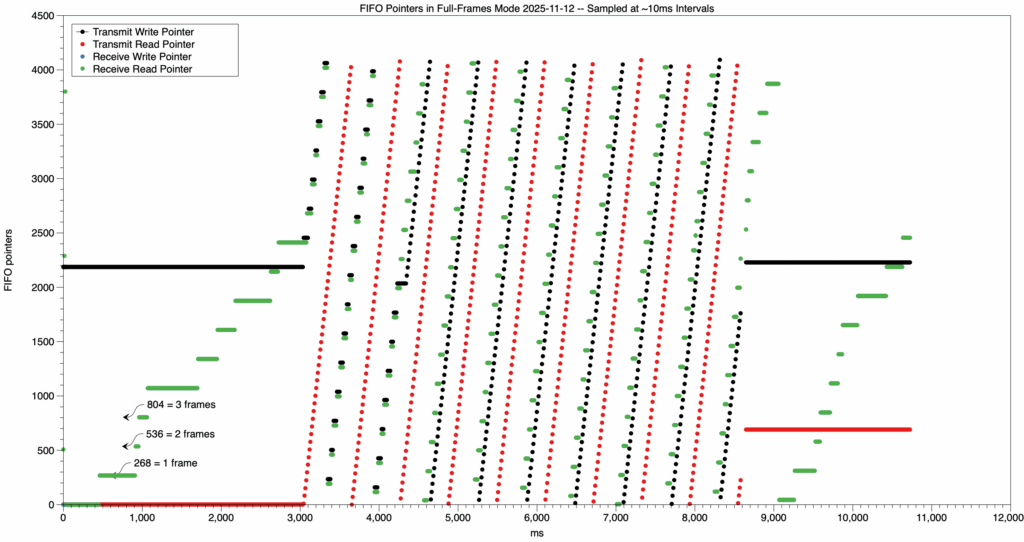
This image, made with the MacOS DataGraph program by Paul Williamson KB5MU, shows that the Opulent Voice transmit first in first out buffer (FIFO) wasn’t properly reset at the start of the program. This means that there was data already in the transmit FIFO at startup. This is not desirable because when we want to transmit, we want to start with the data that we’re sending. Whether this is voice, or keyboard, or a file transfer, we don’t want extra data at the beginning of the transmission. For voice, this might just mean a very short burst of noise. But, for a text message or data file, it could cause corruption. Visualizations like this help make our designs better, because they reveal what’s truly going on with the flow of data through the system. 

How to Train Your Pluto

by Paul Williamson KB5MU

Have you ever saved a `pluto.frm` firmware file and then lost track of which build it was? Or perhaps a whole directory full of different .frm files with cryptic names? This little shell script will analyze the .frm file(s) and give you a little report about each one.

% ./pluto-frm-info.sh *.frm
Version information for pluto-1e2d-main-syncdet.frm:
device-fw 1e2d
buildroot 2022.02.3-adi-5712-gf70f4a
linux v5.15-20952-ge14e351
u-boot-xlnx v0.20-PlutoSDR-25-g90401c
Version information for pluto-peakrdl-clean.frm:
device-fw abfa
buildroot 2022.02.3-adi-5712-gf70f4a
linux v5.15-20952-ge14e351
u-boot-xlnx v0.20-PlutoSDR-25-g90401c
Version information for pluto-peakrdl-debug.frm:
device-fw d124
buildroot 2022.02.3-adi-5712-gf70f4a
linux v5.15-20952-ge14e351
u-boot-xlnx v0.20-PlutoSDR-25-g90401c

The first line gives the `device-fw` *description*. This is created in the Makefile by `git describe –abbrev=4 –always –tags`, based on the git commit hash of the code the .frm file was built with. It may be just the first four characters of the hash, as shown here. It can also include tag information, if tags are in use in your repository, in which case it also inserts the number of commits between the latest tag and the current commit.

Note that if you commit, build a version, make some changes, and build another version without committing beforehand, you will end up with two builds that have the same description. There is no mechanism in the current build procedure to catch that situation, so there’s no way to extract that information from the .frm file.

Theory of Operation

The .frm file for loading new firmware into an ADALM PLUTO, as built with the Analog Devices [plutosdr-fw](https://github.com/analogdevicesinc/plutosdr-fw) Makefile, is in the format of a device tree blob. That is, a compiled binary representation of a Linux device tree. Without specialized tools, this is an opaque binary file (a blob) that is difficult to understand.

So, the first step in understanding the file is to decompile it. Fortunately, the device tree compiler tool, `dtc`, is also able to decompile binary device trees into an ASCII source format.

The decompiled source is in a structured format, and also in a very consistent physical layout. It mostly consists of large image blocks, represented as long strings of two-digit hexadecimal byte values, enclosed in square brackets, each on one very long line of text. There is an image block of this type for each binary resource needed to program a Pluto device. Among other things, this includes an image of the Linux filesystem as it will appear in a RAM disk. The build procedure places certain information about other components of the build into defined locations within the filesystem, in order to make that information available to the Pluto user. We take advantage of the rigid format of the decompiled ASCII format to extract the hexadecimal byte values encoding the filesystem image. This is done in two steps. First, `sed` is used to find the header of this image object, identified by its name `ramdisk@1`, and extract the second line after the line containing that string. Second, the hex data is found between the square brackets using `awk`. This all depends on the exact format of the decompilation, as created by `dtc` in its decompilation mode.

We convert the hexadecimal values into binary using `xxd`. This binary is gzip compressed, so we use `gunzip` to uncompress it. The result is a CPIO archive file containing the Linux filesystem. We use `cpio` to extract from the archive the contents of the file that would be `/opt/VERSIONS` when installed. This file contains the information we are after; we print it to stdout.

That whole procedure is wrapped in a little loop, so it runs once for each file named (or expanded from a wildcard pattern) on the script’s command line.

Prerequisites

This is a bash script, which I’ve developed on macOS Sequoia and Raspberry Pi OS (Debian) bookworm. It ought to work on any Unix-like system.

You will probably need to install some or all of these utilities before the script will work. These should all be available in your favorite package manager, if not already installed on your system.

– dtc
– sed
– awk
– xxd
– gunzip (part of gzip)
– cpio

A special note about `cpio` for macOS users

The script uses the `–to-stdout` command line flag to avoid writing any files to your host’s filesystem. The version of `cpio` that Apple ships with macOS does not support this feature, but the version available in [Homebrew](https://brew.sh) does. When you install `cpio` using brew, you’re warned that brew’s cpio does not override the Apple-provided cpio by default (it’s installed “keg-only”). It provides a modification you can install in your shell’s startup script to add brew’s cpio to the path, so you always get brew’s cpio. If you do that, you can use the standard version of this script, named `pluto-frm-info.sh`. If you choose not to do that (which is what I recommend), and your brew installation is in `/opt/homebrew` as usual, you can use the modified version found in `pluto-frm-info-macOS.sh`. If your brew installation is elsewhere, modify the path to cpio in the macOS version.

Speed

This script does a substantial amount of work on largish data objects, so it can be slow. It takes about 3 seconds per file to run on my 2024 M4 Pro Mac Mini, but it takes about 75 seconds per file on my Raspberry Pi 4B.

Credits

Thanks to all those unknown developers who shared their sed and awk scripts and tutorials on the web, where they could be scraped for LLM training. I don’t know enough `sed` or `awk` to have written the respective command lines without a lot of research and struggle. I used suggestions provided by everybody’s favorite search engine when I asked how to do those tasks, and in this case the LLM-generated answers were more immediately useful than the first few hits of presumably human-generated content.

Missing Features

– Output build time, building user, and building hostname. This information is in the .frm file somewhere, so this feature might be added with some additional research.

– Describe changes since the commit that appears in the build description. As noted above, I think this information is not contained in the .frm file, so it cannot be added.

– In ORI builds, an extract of the git log for the build is placed (by a command in the Makefile) in `root/fwhistory.txt`. This could be extracted the same way as `opt/VERSIONS`, by just changing the string in this script. However, this history information is better extracted from the repo online, starting from the commit revealed by device-fw line in VERSIONS.

Other Places to Find Information

If you have the Pluto up and running, it has a web server. If you look at [index.html](http://pluto.local/index.html) (on the Pluto) with a web browser (on a connected computer), you’ll see all kinds of build information, much more than is returned by this script.

But if you look in the ramdisk image in the pluto.frm file, you’ll find the HTML file in /www/index.html contains only placeholders for all of this information. It turns out that these placeholders are replaced with the actual information by a script that runs when the Pluto boots up. That script is located at /etc/init.d/S45msd (or in the Analog Devices repo at [buildroot/board/pluto/S45msd](https://github.com/analogdevicesinc/buildroot/blob/f70f4aff40bcc16e3d9a920984d034ad108f4993/board/pluto/S45msd)). This script has a function `patch_html_page()` that obtains most of its information from resources that are only available at runtime, such as `/sys`, or by running programs like `uname`. Some of the info comes from /opt/VERSIONS, which is where this script looks. Some of that runtime information actually comes out of the hardware, like the serial number, or non-volatile storage on the hardware, like the USB Ethernet mode. The rest, including more build information, must be in the pluto.frm file somewhere, possibly scattered around in multiple places.

The name of the computer the firmware was compiled and the username of the user who compiled it, and more, are buried in the kernel image, and are made accessible at runtime via

[pluto3:~]# cat /proc/version

Linux version 5.15.0-20952-ge14e351533f9 (abraxas3d@mymelody) (arm-none-linux-gnueabihf-gcc (GNU Toolchain for the A-profile Architecture 10.3-2021.07 (arm-10.29)) 10.3.1 20210621, GNU ld (GNU Toolchain for the A-profile Architecture 10.3-2021.07 (arm-10.29)) 2.36.1.20210621) #2 SMP PREEMPT Fri Nov 7 23:04:52 PST 2025

[pluto3:~]#

The first part of this output is stored in the kernel in a string named `linux_proc_banner` in `init/version.c`. If I knew how to decompress the Linux zImage, I could probably extract this information.

#!/bin/bash
# Output version information embedded in one or more
# Pluto firmware files in .frm format.
#
# Specify filename(s) on the command line. Wildcards ok.
for filename in “$@”; do
echo “Version information for $filename:”
cat $filename |
dtc -I dtb -O dts -q |            
          # decompile the device tree
sed -n ‘/ramdisk@1/{n;n;p;q;}’ |  
          # find the ramdisk image entity
awk -F’[][]’ ‘{print $2}’ |       
          # extract hex data between [] brackets
xxd -revert -plain |              
          # convert the hex to binary
gunzip |                          
          # decompress the gzip archive
cpio --extract --to-stdout --quiet opt/VERSIONS
# extract the VERSIONS file from /opt
echo                                  
     # blank line to separate multiple files
done
IIO Timeline Management in Dialogus — Transmit

The next step in debugging/optimizing the design of the transmit pipeline in Dialogus (https://github.com/OpenResearchInstitute/dialogus) is to get control of the timeline. Frames are coming in via the network from Interlocutor (https://github.com/OpenResearchInstitute/interlocutor), being processed by Dialogus, and going out toward the modulator via iio_buffer_push() calls that transfer data into Linux kernel buffers on the Pluto’s ARM. The kernel’s IIO driver then uses the special DMA controller in the Pluto’s FPGA reference design to turn this into a stream of 32-bit AXI-S transfers into the Modulator block. The Modulator block has hard realtime requirements and is not capable of waiting for an AXI-S transfer that is delayed. Dialogus’s job is to make sure the kernel never runs out of DMA data.

Goals

1. Minimize latency

2. Maximize robustness to timing errors

Assumptions

  • Data frames arrive on UDP-encapsulated network interface from Locutus.
  • Data frames arrive without warning.
  • Data frames stop without any special indication.
  • Data frames may then resume at any time, without necessarily preserving the frame rhythm.
  • Data frames arrive in order within a transmission.

Requirements

  • A preamble frame must be transmitted whenever the transmitter turns on.
  • The preamble frame duration needs to be settable up to one entire 40ms frame.
  • There must be no gap between the preamble and the first frame of data.
  • A postamble frame must be transmitted whenever the transmitter turns off.
  • There must be no gap between the preamble and the postamble frame.
  • Dialogus may insert dummy frames when needed to prevent any gaps.
  • Dialogus must limit the number of consecutive dummy frames to a settable “hang time” duration.
  • Dialogus should not do any inspection of the frame contents.
  • Dialogus should not allow frame delays to accumulate. Latency should be bounded.
  • Dialogus is allowed and encouraged to combine transmissions whenever a transmission begins shortly after another transmission ends. That is, the new transmission begins within the hang time.

Derived Requirements

  • When not transmitting, Dialogus need not keep track of time.
  • When a first frame arrives, Dialogus should plan a timeline.
  • The timeline should be designed to create a wide time window during which a new encapsulated frame may correctly arrive.
  • The window should accommodate frame jitter in either direction from the base timing derived from the arrival time of the first frame.
  • The timeline will necessarily include a hard deadline for the arrival of a new encapsulated frame.
  • When no new frame has arrived by the hard deadline, Dialogus has no choice but to generate a dummy frame.
  • If an encapsulated frame arrives after the deadline but before the window, Dialogus must assume that the frame was simply late in arriving
  • Dialogus should adhere to the planned timeline through the end of the transmission, so that the receiver sees consistent frame timing throughout. The timeline should not drift or track incoming frame timing.

Observations

When the first frame arrives, Dialogus can only assume that the arrival time of that frame is representative of frame timing for the entire transmission. The window for future frame arrivals must include arrival times that are late or early as compared to exact 40ms spacing from the first frame, with enough margin to tolerate the maximum expected delay jitter.

The window does not track with varying arrival times, because that would imply that the output frame timing would track as well, and that’s not what the receiver is expecting. Once a timeline is established, the transmitter is stuck with that timeline until the transmission ends. After that, when the next transmission occurs, a completely new timeline will be established, and the preamble will be transmitted again to give the receiver time to re-acquire the signal and synchronize on the new first frame’s sync word.

When the first frame arrives and Dialogus is planning the time line, the minimum possible latency is achieved by immediately starting the preamble transmission. The hardware must receive the first frame before the end of the preamble transmission, and every frame thereafter with deadlines spaced 40ms apart. That implies that the window must close slightly before that time, early enough that Dialogus has time to decide whether to send the data frame or a dummy frame and to send the chosen frame to the hardware. If the preamble duration is set to a short value, this may not be possible. In that case, Dialogus can either extend the preamble duration or delay the start of the preamble, or a combination of both, sufficient to establish an acceptable window. Essentially, this just places a lower limit on the duration of the preamble.

Let’s think about the current case, where the preamble duration is fixed at 40ms. We’ll ignore the duration of fast processing steps. From idle, a first frame arrives. Call that time T=0. We expect every future frame to arrive at time T = N * 40ms ± J ms of timing jitter. We immediate push a preamble frame and then push the data frame. The kernel now holds 80ms worth of bits (counting down), and Dialogus can’t do anything more until the next frame arrives. If the next frame arrives exactly on time, 40ms after the first frame, then the preamble buffer will have been emptied and DMA will be just starting on the first frame’s buffer. When we push the arrived frame, the kernel holds 80ms of bytes again, counting down. If the next frame arrives a little early, DMA will still be working on the preamble buffer, and the whole first frame’s buffer will still be sitting there, and if we push the arrived frame, it will be sitting there as well, for a total of more than 80ms worth of data. If the next frame arrives a little late, DMA will have finished emptying out and freeing the preamble’s buffer, and will have started on the first frame’s buffer. If we push the arrived frame, there will be less than 80ms worth of data in the kernel. All of these cases are fine; we have provided a new full buffer long before the previous buffer was emptied.

What if the frame arrives much later? If it arrives 40ms late, or later, or even a little sooner, DMA will have finished emptying the previous frame’s buffer and will have nothing left to provide to the modulator before we can do anything about it. That’s bad. We need to have taken some action before this is allowed to occur.

Let’s say the frame arrives sooner than that. There are multiple cases to consider. One possibility is that the frame we were expecting was just delayed inside Interlocutor or while traversing the network between Interlocutor and Dialogus. In this case, we’d like to get that frame pushed if at all possible, and hope that subsequent frames aren’t delayed even more (exceeding our margin) or a lot less (possibly even arriving out of order, unbeknownst to Dialogus).

A second possibility is that the frame we were expecting was lost in transit of the network, and is never going to arrive, and the arrival is actually the frame after the one we were expecting, arriving a little early. In this case, we could push a dummy frame to take the place of the lost frame, and also push the newly arrived frame. That would get us back to a situation similar to the initial conditions, after we pushed a preamble and the first frame. That’d certainly be fine. We could also choose to push just the newly arrived frame, which might be better in some circumstances, but would leave us with less margin. Dialogus might need to inspect the frames to know which is best, and I said above that we wouldn’t be doing that.

A third possibility is that the frame we were expecting never existed, but a new transmission with its own timing was originated by Interlocutor, coincidentally very soon after the end of the transmission we were making. In that case, we need to conform Interlocutor’s new frame timing to our existing timeline and resume sending data frames. This may required inserting a dummy frame that’s not immediately necessary, just to re-establish sufficient timing margin. By combining transmissions in this way we are saving the cost of a postamble and new preamble, and saving the receiver the cost of re-acquiring our signal.

In real time, Dialogus can’t really distinguish these cases, so it has to have simple rules that work out well enough in all cases.

Analyzing a Simple Rule

The simplest rule is probably to make a complete decision once per frame, at Td = N * 40ms + 20ms, which is halfway between the nominal arrival time of the expected frame N and the nominal arrival time of the frame after that, N+1. If a frame arrives before Td, we assume it was the expected frame N and push it. If, on the other hand, no frame has arrived before Td, we push a dummy frame, which may end up being just a fill-in for a late or lost frame, or it may end up being the first dummy frame of a hang time. We don’t care which at this moment. If, on the gripping hand, more than one frame has arrived before Td, things have gotten messed up. The best we can do is probably to count the event as an error and push the most recently arrived frame. Note that we never push a frame immediately under this rule. We only ever push at decision time, Td. We never lose anything by waiting until Td, though. In all cases the kernel buffers are not going to be empty before we push.

It’s easy to see that this rule has us pushing some sort of frame every 40ms, about 20ms before it is needed to avoid underrunning the IIO stream. That would work as long as the jitter isn’t too bad, and coping with lots of frame arrival jitter would require extra mechanisms in the encapsulation protocol and would impose extra latency.

Pushing the frame 20ms before needed doesn’t sound very optimal. We need some margin to account for delays arising in servicing events under Linux, but probably not that much. With some attention to details, we could probably guarantee a 5ms response time. So, can we trim up to 15 milliseconds off that figure, and would it actually help?

We can trim the excess margin by reducing the duration of the preamble. Every millisecond removed from the preamble is a millisecond off the 15ms of unused margin. This would in fact translate to less latency as well, since we’d get that first data frame rolling through DMA that much sooner, and that locks in the latency for the duration of the transmission. This option would have to be evaluated against the needs of the receiver, which may need lots of preamble to meet system acquisition requirements.

We could also reduce the apparent excess margin by just choosing to move Td later in the frame. That effectively makes our tolerance to jitter asymmetrical. A later Td means we can better tolerate late frames, but our tolerance of early frames is reduced. Recall that “late” and “early” are defined relative to the arrival time of that very first frame. If that singular arrival time is likely to be biased with respect to other arrival times, that effectively biases all the arrival times. Perhaps first frames are likely to be later, because of extra overhead in trying to route the network packets to an uncached destination. Perhaps other effects might be bigger. We can’t really know the statistics of arrival time jitter without knowing the source of the jitter, so biasing the window seems ill-advised. Worse, biasing the window doesn’t reduce latency.

Conclusion

I’d argue that the simple rule described above is probably the best choice.